Every UTM tag on the internet is five key=value pairs and nothing else.
I own the system of record under a DSP and an ad exchange that measures ad events from 200M+ devices a day. When a campaign suddenly reports zero conversions, or a traffic spike shows up from a source nobody recognizes, the investigation almost always ends the same way: someone attached the wrong label to a click. The pipeline did exactly what it was told. It was told the wrong thing.
UTM tags are where most of that labeling happens, and they are simple enough that you can build one by hand in thirty seconds.
So that’s today’s post.
Today’s Post
Everything you need to tag a link correctly, in seven sections.
- What a UTM tag actually is
- The five parameters, one at a time
- Source versus medium, settled for good
- Building a real tagged URL, step by step
- How GA4 actually reads them
- Why a UTM taxonomy is a data contract
- The mistakes that wreck dashboards, and how to dodge them
1. What a UTM tag actually is
Strip away the jargon and a UTM tag is text added to the end of a URL. Nothing more.
You already know what a URL looks like.
https://example.com/pricing
A URL can carry extra information after a ?, in something called a query string. Each piece is a key=value pair, and an & joins multiple pairs.
https://example.com/pricing?key1=value1&key2=value2
That is the whole mechanism. example.com can ignore the query string entirely and still serve the same /pricing page. Google Analytics, running on that page, reads the key=value pairs instead and uses them to figure out where the visitor came from.
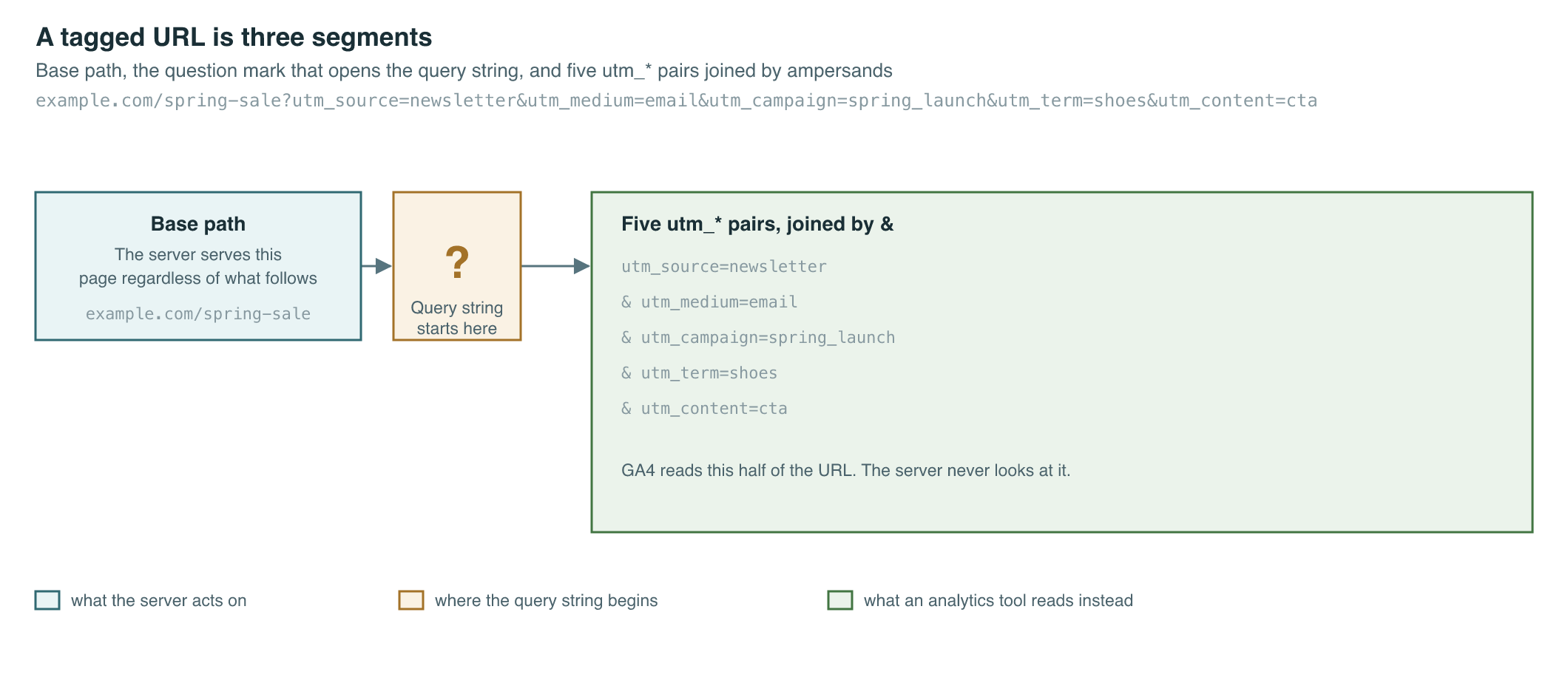
A “UTM tag” is a specific, agreed-upon set of those keys, all starting with utm_.
https://example.com/pricing?utm_source=newsletter&utm_medium=email&utm_campaign=spring_launch
Click that link and you land on the normal pricing page. Google Analytics quietly reads the three utm_* parameters and records the visit against newsletter / email / spring_launch. No tracking magic on the link itself, just a labeled URL and a tool that knows how to read the label.
UTM stands for Urchin Tracking Module, after the analytics company Google bought in 2005 to build Google Analytics. We will cover that history in the next post. For now, treat “UTM” as shorthand for “the five parameters analytics tools agree to read.”
2. The five parameters, one at a time
There are exactly five UTM parameters. GA4 technically requires only source and medium. Treat campaign as required by convention, and term and content as optional.
| Parameter | Question it answers | Example value |
|---|---|---|
utm_source | Where did the visitor come from? | google, newsletter, linkedin |
utm_medium | What type of channel was it? | cpc, email, social, referral |
utm_campaign | Which marketing effort does this belong to? | spring_launch, black_friday_2026 |
utm_term | Which keyword did they search? | running_shoes |
utm_content | Which version of the creative or link? | header_cta, blue_button |
Almost everyone gets stuck on the same two rows: source versus medium. Let’s fix that in the next section, but first, the other three, quickly.
utm_source is the proper noun of the referral: the specific platform, publication, or property. A click from your newsletter is utm_source=newsletter. A click from a partner’s banner is utm_source=techcrunch. If you can point at a specific brand, that is your source.
utm_campaign ties the click to a marketing initiative so you can measure that initiative as a whole across every channel it ran on. Your spring launch might run on email, paid search, and LinkedIn at once. Tag all three utm_campaign=spring_launch_2026 and you can pull one report for the entire launch.
utm_term was built to capture the search keyword behind a paid ad, utm_term=running_shoes. If you run Google Ads with auto-tagging (section 7 covers that), the platform tracks keyword-level data for you, and you rarely set utm_term by hand. It is the least-used of the five.
utm_content distinguishes between multiple links pointing to the same destination, usually for an A/B test. If your email has a header button and a footer link both going to /pricing, tag them utm_content=header_cta and utm_content=footer_link. Now you can see which placement actually drove the click.
3. Source versus medium, settled for good
utm_medium describes the category of channel, not the brand. This is the parameter people fumble most, because it feels redundant with source.
Here is the mental model that fixes it permanently.
Medium is the bucket. Source is the thing inside the bucket.
email is a bucket. Inside it you might find newsletter, welcome_series, winback. Those are sources. social is a bucket; linkedin and twitter are sources inside it. cpc is a bucket; google and bing are sources inside it.
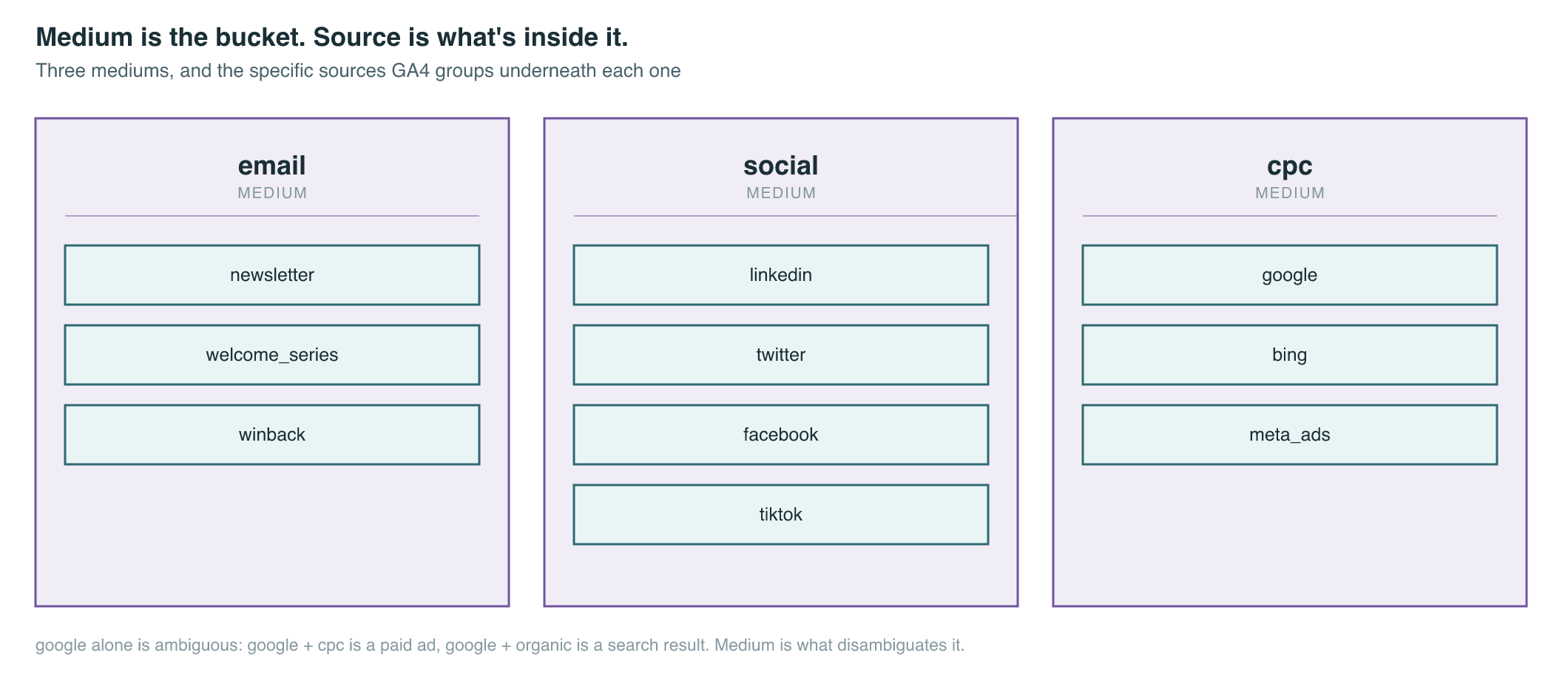
google alone is ambiguous. It could mean paid search, organic search, or a display ad on a Google property. Medium is what disambiguates it.
utm_source=google&utm_medium=cpcis a paid Google search ad.utm_source=google&utm_medium=displayis a Google display banner.
Same source, two completely different channels, two completely different budgets to evaluate.
When you’re stuck, ask yourself one question: if you were grouping all your traffic into a handful of channels for a board slide, which word would you use? That word is the medium. The more specific name is the source. GA4 pairs them constantly as source / medium, like newsletter / email or google / cpc. That slash-joined pair is the backbone of channel reporting.
4. Building a real tagged URL, step by step
Scenario: you’re sending a newsletter promoting a spring sale, and you want to know how the header button performs specifically.
Step 1, start with the destination. Where do you actually want people to land?
https://example.com/spring-sale
Step 2, add the question mark.
https://example.com/spring-sale?
Step 3, add the three core parameters. Source is the newsletter, medium is email, campaign is the spring sale.
https://example.com/spring-sale?utm_source=newsletter&utm_medium=email&utm_campaign=spring_sale_2026
Step 4, add the optional content parameter to identify this specific button.
https://example.com/spring-sale?utm_source=newsletter&utm_medium=email&utm_campaign=spring_sale_2026&utm_content=header_cta
Read that back in English: a visit to the spring-sale page, from the newsletter, via email, as part of the spring_sale_2026 campaign, from the header button. Every clause maps to a parameter.
Three mechanical rules while you build:
- The first parameter is preceded by
?, every parameter after it by&. - No spaces. Use underscores or hyphens. A literal space encodes to
%20and makes values ugly. - Keep a consistent order, source, medium, campaign, term, content, so links stay readable to humans even though order doesn’t matter to the parser.
Google’s Campaign URL Builder is a free form that assembles these for you, and most email and marketing platforms have one built in. Learn the anatomy anyway. Every builder is gluing the same five keys onto a ?.
5. How GA4 actually reads them
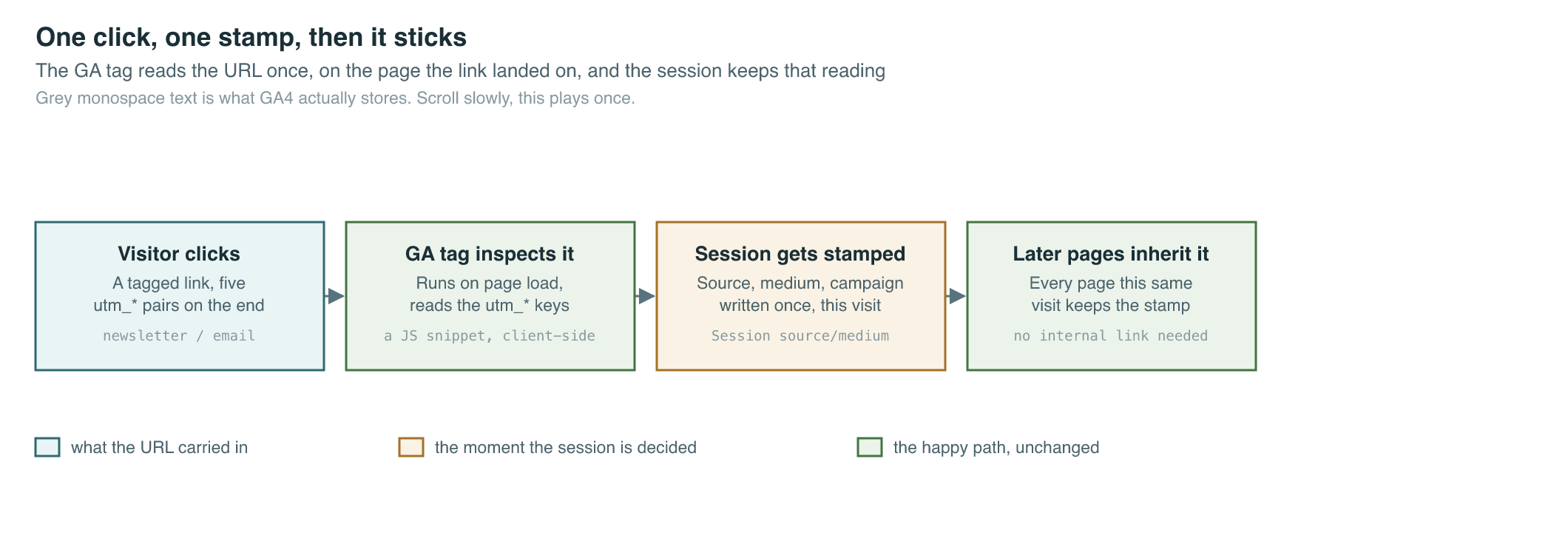
When someone clicks the tagged link, the Google Analytics tag, a small JavaScript snippet, runs in their browser. It inspects the page’s URL, finds the utm_* parameters, and records them against that session.
Three behaviors worth knowing.
A session inherits the campaign that started it. If a user arrives through your tagged link and browses ten pages, all ten belong to that campaign. You do not need to tag internal links, and you should not, for reasons section 7 covers.
GA4 reports these under acquisition dimensions named Session source, Session medium, and Session campaign. Those names map one-to-one to your UTM parameters.
Values are case-sensitive. Email and email are two different mediums to GA4. This one fact causes more dashboard mess than any other rule on this page.
6. Why a UTM taxonomy is a data contract
Here is the part most beginner guides skip, and the part that matters once more than one person tags links.
I own a pipeline that ingests billions of ad events a day, underneath a DSP and an ad exchange. The lesson from running infrastructure at that scale is that the value of data is capped by the consistency of how it was recorded. A column holding email, Email, e-mail, and newsletter-email for the same concept is not four times richer. It is broken. You cannot GROUP BY it, and every report built on it silently lies.
UTM parameters are exactly that kind of column, except the people filling them in are marketers spread across teams, agencies, and copy-pasted spreadsheets. Without a rule, you get drift. Facebook, facebook, and FaceBook show up as three separate campaigns, and your Facebook traffic scatters across rows that no dashboard adds back together.
Treat your UTM scheme as a data contract instead, a written and enforced agreement about how values are formed.
- Lowercase everything, always. GA4 is case-sensitive. The only safe rule is no capitals, ever.
- Fix a vocabulary for medium. Mediums are a small, closed set:
cpc,email,social,paid_social,referral,display,affiliate. Publish the list. A new medium requires a deliberate decision, not a marketer’s improvisation. - Pick one separator and one campaign format. For example,
{quarter}_{initiative}_{year}becomesq2_spring_sale_2026. Document it, and never mix underscores and hyphens. - Centralize link creation. A shared spreadsheet, a builder tool, or a small internal app, anything that stops ten people from inventing ten conventions. This is governance. It is boring, and it is the difference between reporting you can trust and reporting you cannot.
If a written taxonomy sounds like overkill for a handful of URL parameters, remember that by the time you notice the drift, the bad data is already sitting in your historical reports and you cannot retroactively clean it. The contract has to exist before the first link goes out.
7. The mistakes that wreck dashboards, and how to dodge them
Tagging internal links. The most damaging mistake on this list. Put UTM tags on a link between two pages of your own site, and GA4 reads the internal link’s utm_* values and overwrites the session’s source, medium, and campaign mid-visit. Your true external attribution gets replaced by one you inflicted on yourself.
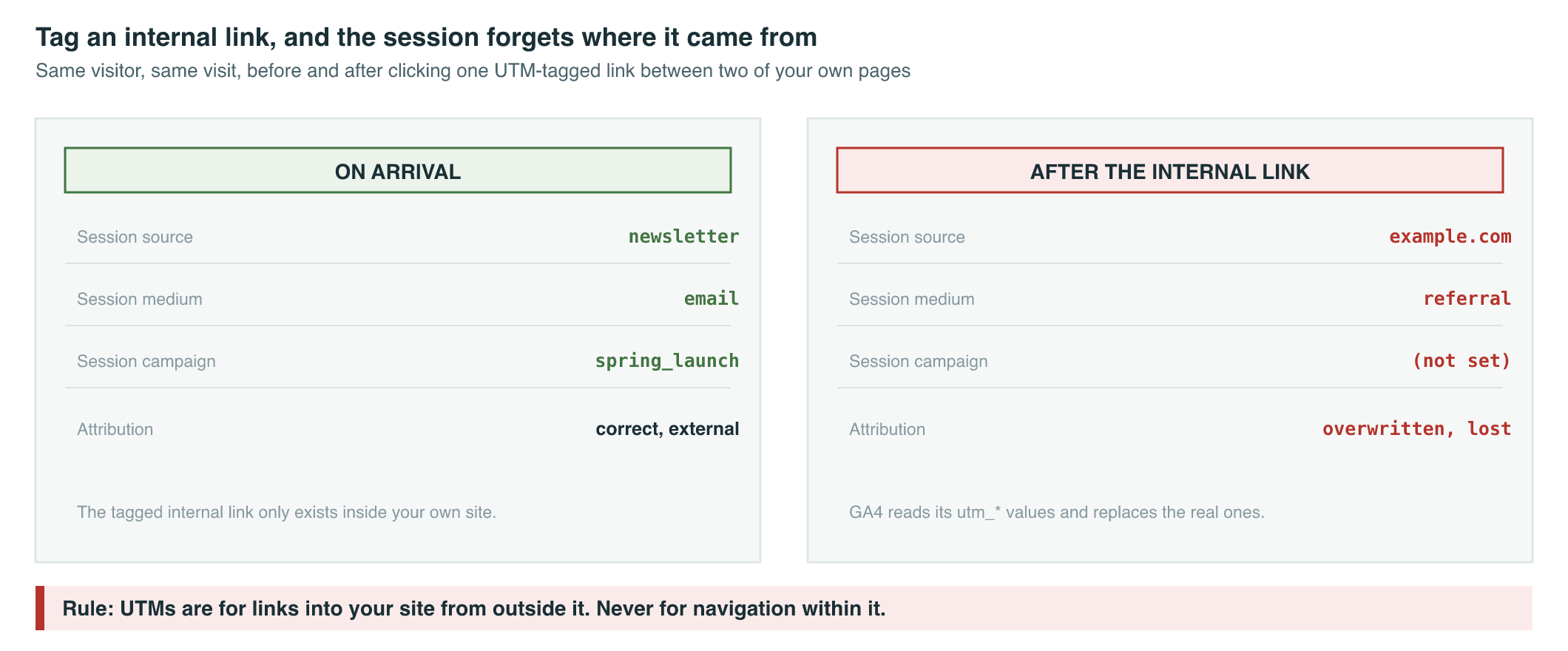
Rule: UTMs are for links into your site from outside it. Never for navigation within it.
Inconsistent casing. LinkedIn and linkedin split your data into two rows. Lowercase everything, every time.
Confusing auto-tagging with manual UTMs. Google Ads has a feature called auto-tagging that appends its own parameter, gclid (Google Click Identifier), to your destination URLs automatically. gclid is a unique, opaque ID that Google and GA4 use to stitch click data to ad-platform data behind the scenes, and it carries richer detail than a manual UTM can. Let Google Ads auto-tag with gclid for your Google paid traffic. Use manual UTMs for everything Google cannot see: email, newsletters, partner links, organic social, offline QR codes. Do not put conflicting manual UTMs on your Google Ads URLs. gclid already feeds GA4 the richer data, and a mismatched manual value, or a redirect that strips the gclid, can mis-attribute the traffic.
gclid and UTM solve the same problem, attribution, for different scopes. gclid is resolved server-side by Google’s own systems. UTMs are open parameters any analytics tool can parse.
Spaces and special characters in values. A space encodes to %20. An ampersand inside a value breaks the parsing entirely. Stick to lowercase letters, numbers, underscores, and hyphens.
Leaving campaign blank. GA4 only strictly requires source and medium, but always set campaign anyway, by convention, so you can see the initiative and not only the channel.
Takeaways
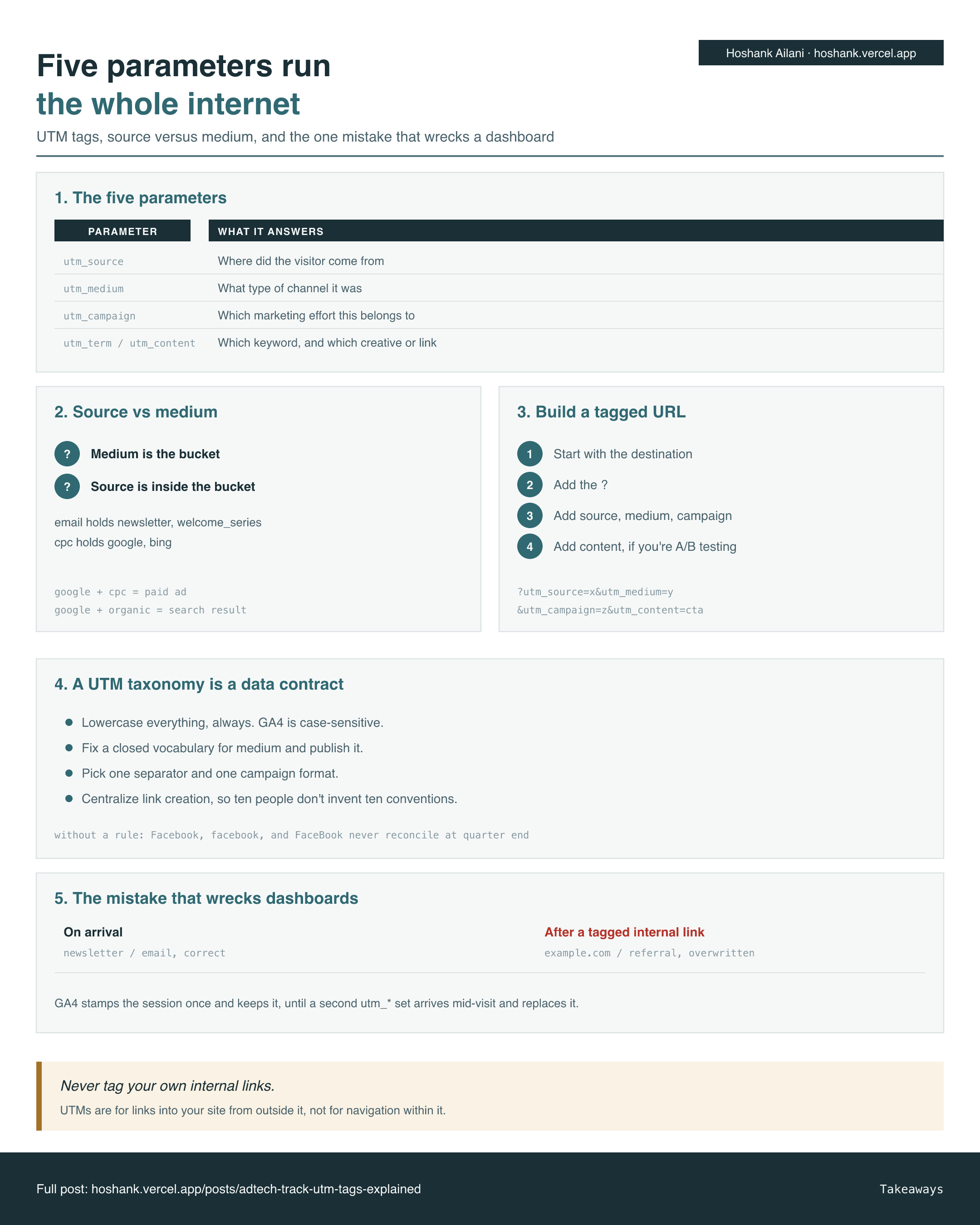
Five parameters, one bucket rule, one data contract, and one mistake worth memorizing above the rest: never tag your own internal links.
Final Words
You can now look at a tagged link and read it fluently: which platform, which channel, which initiative, which creative. Build one yourself, lowercase every value, keep your hands off your own internal navigation, and let gclid do the job it was built for.
In the next post we zoom out and ask where this all came from. Why is it called “Urchin”? How did one 2005 acquisition shape two decades of web measurement, and what happened when the cookie that powered most of it started to die?
Cheers, Hoshank