Most AI product failures are not model failures. They are experience failures.
The model does something plausible. The product lets that plausibility read as truth. Ship enough of those moments and you get angry users and bad decisions, and the fix everyone reaches for first, a bigger model, doesn’t touch the actual problem.
Designing for AI means helping people form correct beliefs about three things: what the machine can do, how much to trust one specific output, and what to do when it’s wrong. Get that right and a mediocre model still ships a product people trust. Get it wrong and the best model in the world still burns you.
So that’s today’s post.
Today’s Post
Seven mechanisms that decide whether an AI feature earns trust or loses it, each one grounded in a product I actually shipped.
- Progressive disclosure, so the surface area doesn’t overwhelm on day one
- Setting expectations for a statistical machine, not a helpful colleague
- Failure design, the product decisions that matter after the model is wrong
- Trust calibration and why legible confidence beats uniform polish
- Human-in-the-loop as a workflow with a budget, not a slogan
- How the same model earns different obligations depending on the interaction pattern
- Metrics that separate real usage from thrashing and rubber-stamping
1. Progressive disclosure keeps the surface area from overwhelming day one
AI products tempt you to expose everything at once. Models, modes, tools, settings, a blank prompt box that can theoretically do anything. That reads as powerful in a demo and paralyzing in real work.
Progressive disclosure means shipping one simple default path, then revealing depth once a user’s intent earns it. This is old UX wisdom. AI amplifies the need for it because the surface area of “what you could ask” is unbounded, and an unbounded surface with no entry point just reads as a blank page.
VocalApply, a voice agent I built that fills job applications by conversation, makes this concrete. It runs two tool scopes, one for browsing a careers board and one for filling out a form, six tools and nine tools respectively, and never registers both at once. Carrying the form-filling tools while the user is still browsing would let the agent describe a form that isn’t even on screen yet. A self-check asserts the live registry is exactly one of the two sets, at boot, so a leak fails loudly instead of shipping quietly.
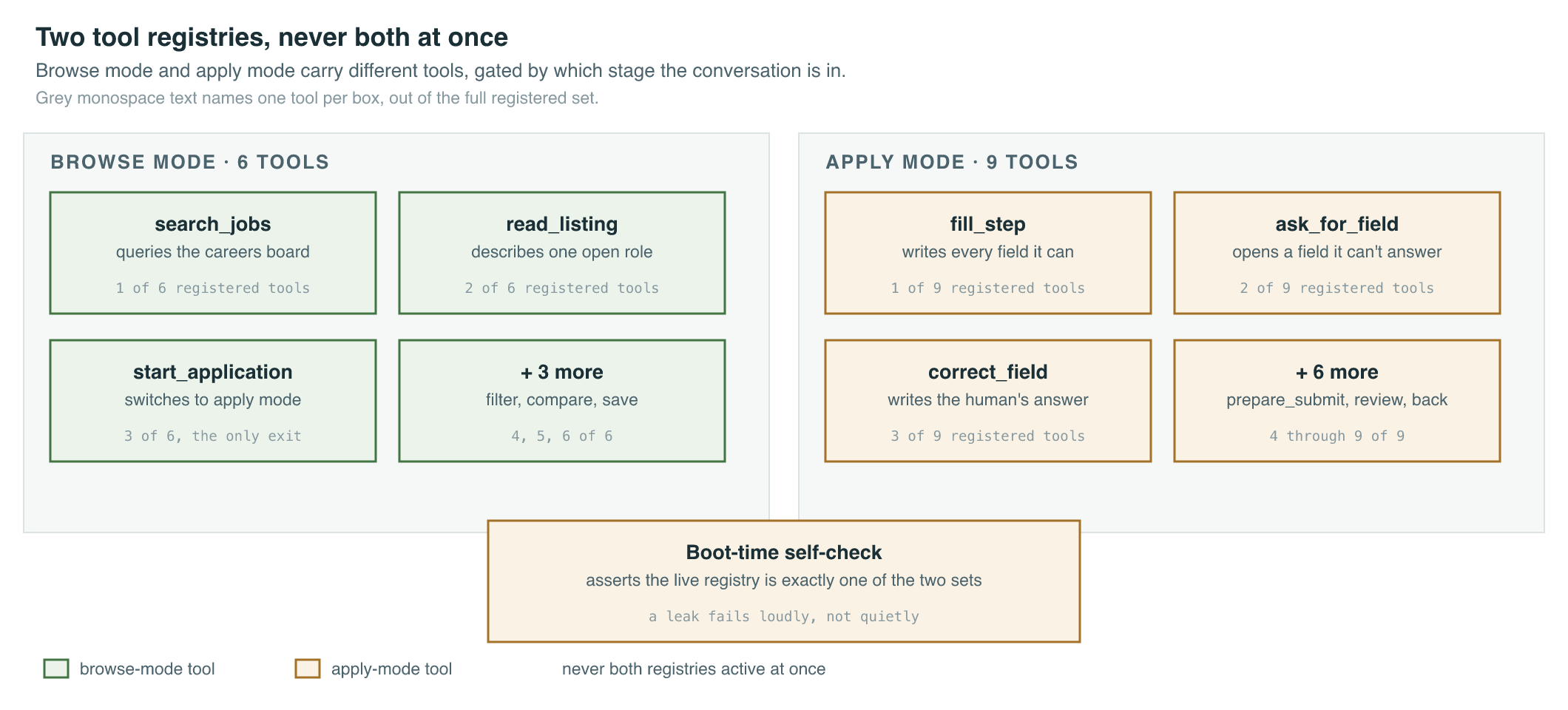
That’s the pattern at the product level. Practically, it breaks into three moves.
- Start with task-shaped entry points. “Summarize this thread” beats a blank prompt, because it tells the user what the box is for before they’ve typed a word.
- Gate advanced controls behind proven intent. A user who has run the same query five times has earned a shortcut; a first-time user has not earned five settings.
- Keep system behavior explainable at the level the user needs. Not a lecture on how the model works, just enough to predict what happens next.
The goal isn’t hiding power. It’s sequencing the learning so the user’s mental model catches up to what the system actually does.
2. Set expectations for a statistical machine, not a helpful colleague
Large language models are confident generators. They don’t know things the way a colleague knows things. They produce likely continuations of text, and “likely” and “true” are different properties that happen to correlate often enough to fool you.
That gap is where trust incidents start. Your interface has to say, without sounding defensive, three things: what the system is for, that outputs can be wrong, and what verification looks like for the task in front of the user right now.
This isn’t disclaimer theater. It’s calibration, and calibration has to flex with stakes. A marketer drafting ad copy and a compliance officer drafting a filing are both using “generate text,” but the cost of a wrong answer differs by orders of magnitude between them. VocalApply draws that line explicitly: it will fill all eighteen fields of a job application it can answer, correct any field on request, and open the one question it can’t answer for you to fill in yourself, but no tool call and no spoken instruction can ever press submit. prepare_submit calls focus() on the button and returns submitted: false, every time, measured against a real browser rather than asserted in a spec. A submitted application with a fabricated answer is a lie with your name on it, and voice makes “just say yes and send it” the obvious next feature to build. The whole proof of concept exists to refuse that feature.
The lesson generalizes past one demo: decide which action in your flow is the submit button, then make sure nothing, not a tool call, not a clever prompt, not a distracted user saying “just do it,” can reach that button without a person meaning to press it.
3. Designing for failure is designing the product
When the model is wrong, something still happens downstream. A designer ships an off-brand ad. A marketer sends the wrong email. Someone makes a call on a hallucinated fact. Failure design is the set of product decisions that sit around that moment, and it matters more than the moment where the model is right, because a system that’s right 95% of the time is defined by what happens the other 5%.
The strongest example I’ve shipped is the brand-guideline check inside AdRoom, the AI creative studio I led at Pixis. The obvious move was to generate first and review after. We enforced brand guidelines, fonts, color, logo rules, voice, at generation time instead, so an off-brand asset couldn’t exist in the first place rather than getting caught by a human later. That one decision is why marketers trusted self-serve creation instead of quietly routing everything back through a designer, and it’s the reason designer workload on that team dropped 80% with the manual QA gate removed entirely, not just reduced.
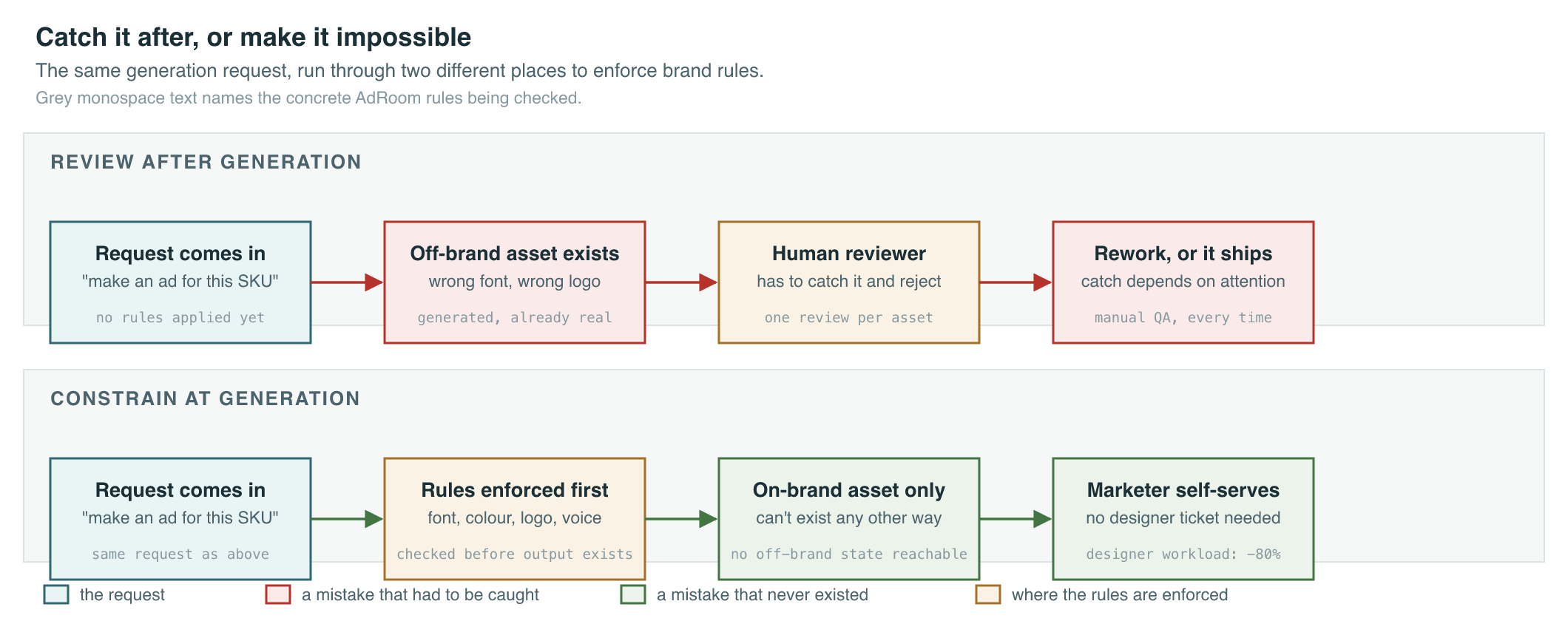
Prism, the natural-language co-pilot I led at Pixis, drew the same line at a different point in the flow: the AI proposes an action on a live campaign and explains why, and a human commits it. One-click campaign changes were the whole value of the product and the whole risk of it, and “propose, don’t decide” is the pattern that let both survive in the same feature.
Strong failure design in general includes non-destructive defaults (generated content stays draft state until a human accepts it), undo and version history for AI edits, visible provenance for what the answer used, and graceful degradation when the AI is down. Weak patterns look like auto-submitting AI output or treating “regenerate” as a substitute for someone actually checking the work. The review question that catches the weak version: if this output were wrong, how would a careful user catch it before the harm happened? “They just would” is not an answer.
4. Trust calibration means legible confidence, not uniform polish
People over-trust fluent text. They also under-trust a system that burned them once with a silent error. Both failure modes come from the same root cause: the interface presents every output with the same confident tone, so the user has no signal to tell a solid answer from a shaky one.
Legible confidence means separating two things people conflate: what the model itself is confident about, which is often poorly calibrated or unavailable in useful form, and what the product chooses to show based on checks, consistency tests, and review gates it actually ran.
Advance, the performance-optimization layer at Pixis, is the cleanest version of this I’ve built. It scores its own predictions instead of presenting every bid or budget recommendation with identical confidence. That confidence score is not decoration. A recommendation a buyer can’t rate is a recommendation a buyer won’t trust with real ad spend, and the scoring is what let 400+ enterprise customers hand real money to a system running 24/7 without a human checking every call.
The uniform-polish failure is the opposite of that: everything in the interface looks equally trustworthy, so nothing warns the user when the ground underneath one specific answer is thinner than usual. Differentiating the interface when quality drops, an explicit “low confidence” state, a flag when retrieval comes up empty, a visibly different treatment for a field the system is guessing at, is how you fight over-trust without resorting to blanket disclaimers that train users to ignore every warning equally.
5. Human-in-the-loop is a workflow you budget, not a slogan you print
Human-in-the-loop means a person with real authority makes or approves the decision that matters. The product work is deciding where that person sits in the flow, what they see when the decision reaches them, and how fast the loop runs.
The pattern shows up twice in the work I’ve shipped, in opposite directions. Prism uses “suggest, don’t decide”: the AI proposes a campaign action and the human commits it, on every single action, because the actions touch live ad spend. VocalApply uses a narrower version of the same idea on one specific field: it will fill every field of an application it can answer correctly, but it stops and asks a human at the one field it can’t, the declaration checkbox that says “I have read this application,” rather than guessing or skipping past it.
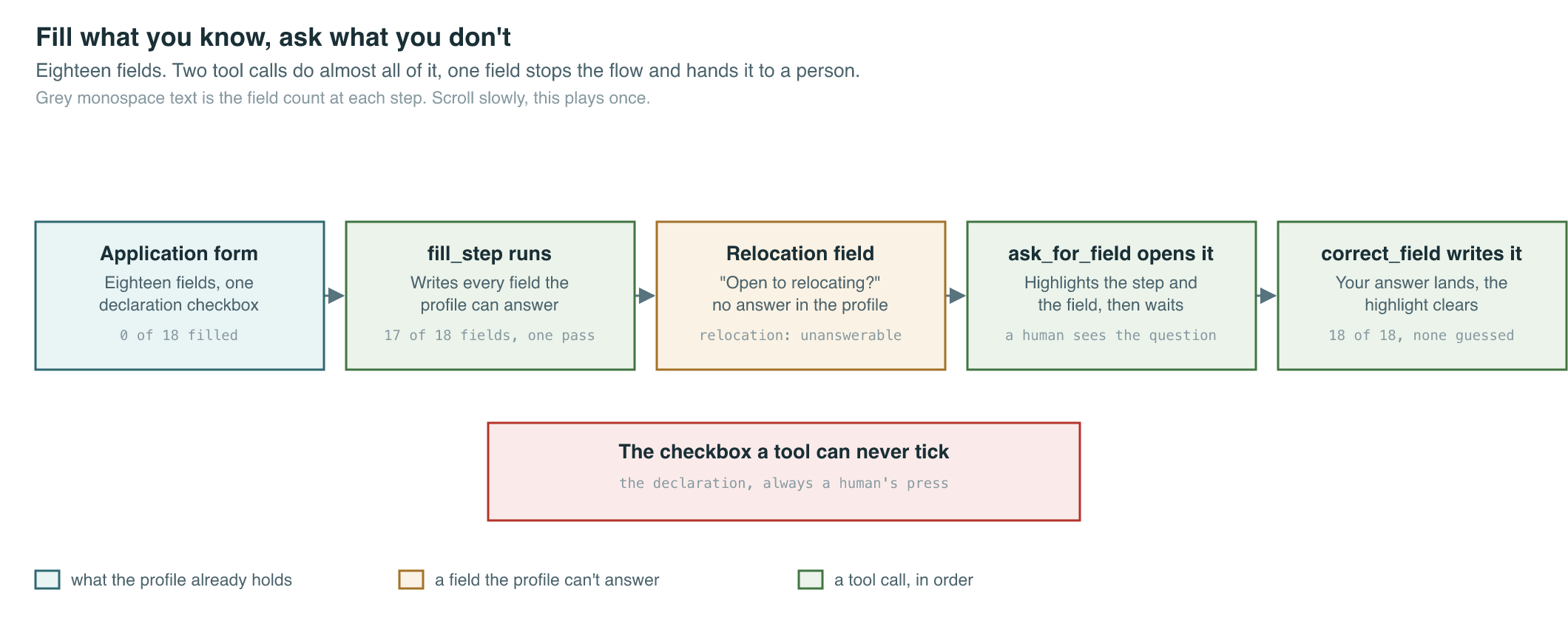
The failure mode to avoid is treating the human as a liability sponge, where automation speeds up until something breaks and the blame lands on whoever was supposed to catch it. The fix is budgeting review time the way you’d budget any other resource. At Pixis, fifteen-plus voice-of-customer interviews per launch turned into exactly five roadmap features, not fifty, because declining the other forty was the actual discipline, not a side effect of running out of time. Treating a killed idea as evidence, and evidence as a win, is what makes that discipline survive past one launch.
6. The same model carries different obligations depending on the interaction pattern
PMs should pattern-match the interaction shape, not treat “AI feature” as one undifferentiated thing. The same model behind the API behaves like a different product depending on how a person meets it.
Autocomplete is low-friction and high-frequency, so latency dominates and errors need to be cheap to correct with a keystroke, not a modal. Users build muscle memory fast, and a sudden behavior change feels like a broken keyboard.
Suggestions are opt-in nudges, where dismissibility matters as much as accuracy. Over-suggest and users learn to ignore the feature entirely, which buries the real opportunities under the noise of the bad ones.
Generation, like AdRoom producing a full creative asset, needs scaffolding: editable layers, not a single regenerate button, and a clear “this is draft” framing so a long output doesn’t bury an error in the middle of it. That’s exactly what the AdRoom Editor gave marketers: a real canvas with layers and projects, not a black box that spits out a finished file.
Classification and routing hide mistakes inside downstream logic, so the interface has to expose why something was classified a certain way and offer an override, or the mistake compounds silently for weeks before anyone notices.
Voice and conversational agents, like VocalApply and Prism, collapse several of these patterns into one surface, which is exactly why they need the tightest scoping. Prism collapses query, creative generation, and reporting into one conversation. VocalApply collapses search and form-filling into one voice flow. Both earn that collapse only because the boundary of what the agent can act on, not just what it can say, stays explicit.
Pick the pattern that matches the cost of a wrong answer and the amount of attention the user actually has to give, not the pattern that demos best on a stage.
7. Metrics for AI UX have to separate real usage from thrashing
High usage numbers can mean the feature works. They can also mean users are regenerating endlessly because the first answer was bad, or rubber-stamping AI output to save time without actually reading it. A dashboard of clicks alone can’t tell those three apart.
Pair behavioral metrics with quality proxies: edit distance or time-to-accept on generated drafts tells you whether people actually used the output as given. Override rate on classifications and routes is a trust-calibration signal in disguise. Escalation and revert rates after an AI-assisted action are a silent-failure detector, because a silent failure by definition doesn’t show up anywhere else. Task completion time end-to-end matters more than time-to-first-response, because a fast wrong answer that gets corrected later is slower than a slightly slower right one.
If engagement is rising and downstream errors are rising with it, the dashboard is telling you the feature is popular and broken at the same time, and popularity is the metric that will get read out in the room first.
Takeaways
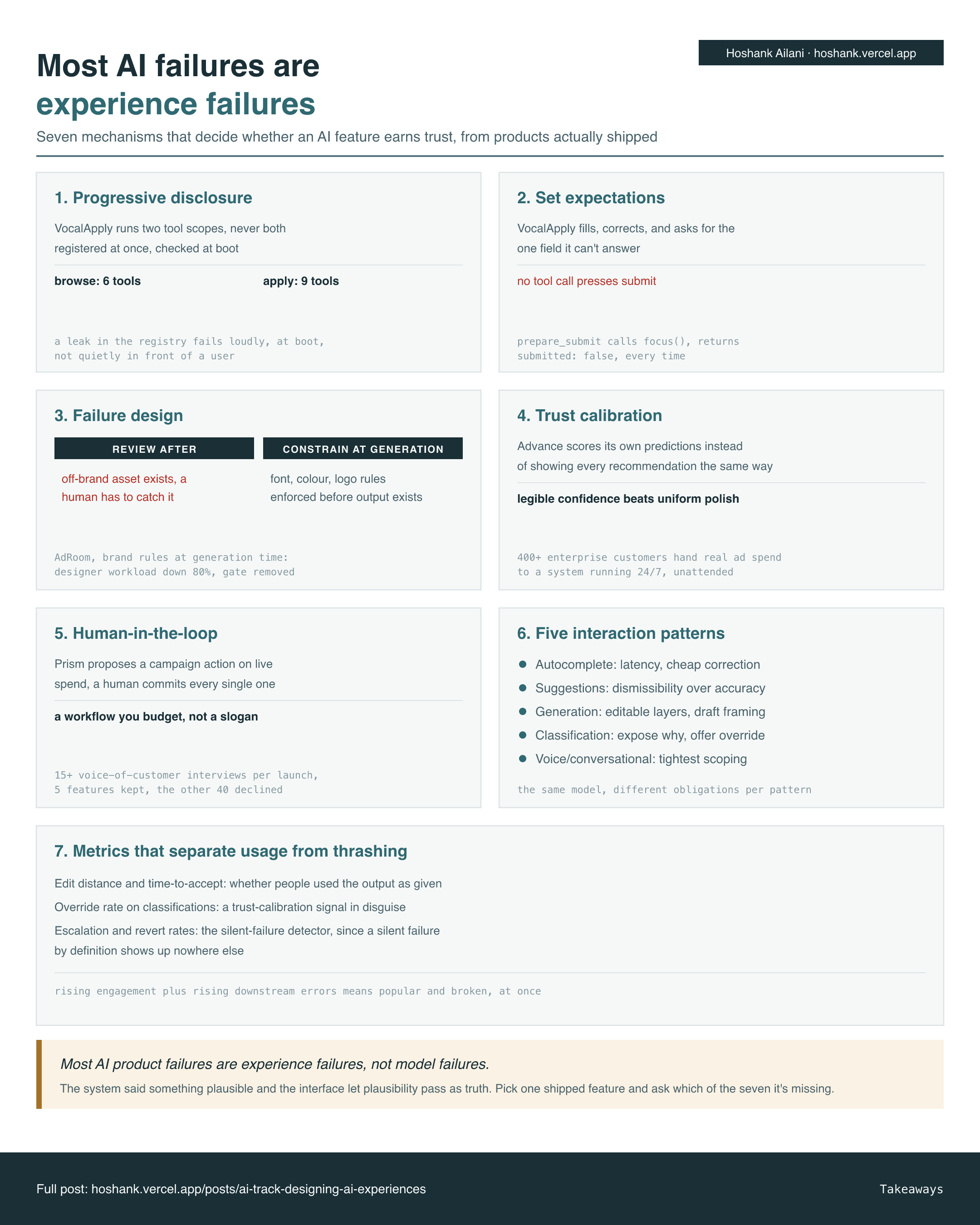
Seven panels, one per section. The callout is the thesis, and the test to run on the AI feature you shipped last.
Final Words
None of these seven mechanisms require a better model. They require deciding, before you ship, what the user is allowed to believe about the system and what the system is allowed to do without asking first. Pick one feature on your roadmap right now and ask which of the seven it’s missing.
Reply and tell me which one you found. I’m collecting the gaps for a follow-up.
Cheers, Hoshank