A Google search happens on Google’s servers. The click that follows happens in a browser on someone’s phone. Two machines, two owners, two separate books. Google Search Console keeps the first book: a query was typed, your URL was shown, at roughly this position, and someone clicked or did not. Google Analytics 4 keeps the second: a browser loaded a page, fired events, and possibly converted. Every SEO report that puts those two books side by side and asks why the totals disagree is asking the wrong question. They disagree because they were never counting the same thing.
Webmaster Tools Was Never an Analytics Product
Google launched Webmaster Tools in 2006 as a diagnostic channel between its crawler and the people running websites. It reported crawl errors, indexing status, and manual penalties, because those were things only Google knew. On 20 May 2015 Google renamed it Search Console, explicitly to widen the audience past the job title “webmaster” to marketers, designers, and app developers (Search Engine Land). A rebuilt interface arrived in January 2018, and the last of the old reports were retired in September 2019.
The rename changed who used the tool. It did not change what the tool is. Search Console is a window onto Google’s index and Google’s results page, not onto your site. Every number in it describes an event that happened inside Google’s infrastructure, which is why you cannot instrument it, cannot tag it, and cannot fix a discrepancy in it by shipping code. You get what Google chooses to report, at the grain Google chooses to report it.
Four Metrics and Nothing After the Click
The Performance report has exactly four metrics: clicks, impressions, CTR, and average position, sliced by query, page, country, device, search appearance, and date (Search Console Help). That list is worth staring at, because two of the four are routinely misread.
Average position is not your ranking. It is the average, across impressions, of the topmost position at which your site appeared for each impression. Pick up impressions on a long tail of queries where you sit at position 40, and your average position gets worse without a single ranking moving. The metric is a weighted average whose weights are your impression mix, and impression mix changes constantly.
An impression means your result was part of the result set shown, which for some search features depends on whether the user scrolled far enough for it to render. So an impression is not “a person saw this.” It is “Google served this.”
Around the Performance report sits the diagnostic surface that Webmaster Tools always was: the Page Indexing report, sitemap submission, URL Inspection with a live crawl and render, structured-data and rich-result reports, manual actions, and security issues. The Core Web Vitals report shows 28 days of field data drawn from the Chrome User Experience Report, bucketed into Good, Needs Improvement, and Poor (Search Console Help). The specific metrics in that set have changed over time, most recently when Interaction to Next Paint replaced First Input Delay as the responsiveness metric.
Getting data out has hard walls. The Search Analytics API returns up to 25,000 rows per request, raised from an earlier 5,000, against a ceiling of roughly 50,000 rows per search type per site per day, paginated with startRow (Search Engine Land). Retention is 16 months, and older data is deleted rather than hidden. The bulk data export to BigQuery, announced in February 2023, is the only route to unaggregated rows and to history past that 16-month wall (Google Search Central). Any SEO program that intends to still have 2023 data in 2027 needs that export switched on today, because nothing recovers a deleted month.
What Search Console does not have, at any grain, is a session, a user, a conversion, or a currency amount. Nothing after the click exists in its model. That is not an oversight to be worked around. It is where the tool’s jurisdiction ends.
The Word GA4 Never Receives
GA4’s model is the mirror image. It has sessions, users, engagement, conversion events, and revenue, and it labels the traffic google / organic. What it does not have is the query.
This is not GA4 withholding something. The query is not transmitted. Once Google moved search to HTTPS, the referrer stopped carrying the search term, which is why Universal Analytics reported the term as (not provided) for years, and why GA4 does not offer a query dimension at all. The string a user typed exists on Google’s side of the click and never crosses to yours.
So the split is clean and it is structural. Search Console holds query without outcome. GA4 holds outcome without query.
| Google Search Console | Google Analytics 4 | |
|---|---|---|
| Measurement plane | SERP-side, on Google’s servers | site-side, in the user’s browser |
| Unit of observation | impression and click | event, with sessions derived |
| Has query | yes, subject to anonymization | no, and never will |
| Has session, user, conversion | no | yes |
| Scope | Google Search only, split by search type | all channels, including non-Google search engines |
| Retention | 16 months, then deleted | configurable, with BigQuery export as the archive |
| Unaggregated access | bulk export to BigQuery, from 2023 | BigQuery export, free tier |
| Can you instrument it | no | yes, via tags you control |
Why Clicks Never Equal Sessions
Practitioners keep trying to close the gap between GSC clicks and GA4 organic sessions. The gap has at least six independent causes, and they do not cancel out.
- Definitions. A click is one press of one result. A session is a window of activity with a thirty-minute inactivity timeout. One person clicking three of your results in ten minutes generates three clicks and can generate one session.
- Where counting happens. Search Console counts before your page loads. GA4 counts after your JavaScript executes. Everything in between is invisible to Search Console and lost to GA4: redirects, abandoned loads on slow connections, blocked tags, ad blockers, browsers that never run the script.
- Consent. Under Consent Mode’s basic configuration, a visit that never grants consent produces no GA4 data at all. The click was already counted on Google’s side.
- Channel scope. GA4’s Organic Search channel includes Bing, DuckDuckGo, and everything else. Search Console covers Google Search only, and splits web, image, video, and news into separate search types you have to select deliberately.
- Timing. Search Console data arrives with a lag, roughly 48 hours for the GA4-linked reports. GA4’s daily BigQuery tables are restated for up to three days. Compare a fresh day in one against a settled day in the other and you have manufactured a discrepancy.
- Deliberate suppression. Anonymized queries in Search Console and thresholded rows in GA4 remove data on purpose, which is The Data You’re Not Allowed to See.
The useful move is to stop reconciling and start monitoring the ratio. Track clicks-to-sessions per landing page as a standing diagnostic. The absolute level tells you little. A sudden change in that ratio for one template, with search demand flat, is almost always a tagging or redirect regression, and it is the fastest signal you will get that someone shipped a broken consent banner.
The Join Key Is a URL
Linking Search Console to a GA4 property is a property-level setting, and it produces two prebuilt reports: Queries, and Google organic search traffic, which puts GA4 landing pages next to Search Console clicks, impressions, CTR, and average position (Analytics Help). Data lands roughly 48 hours after collection.
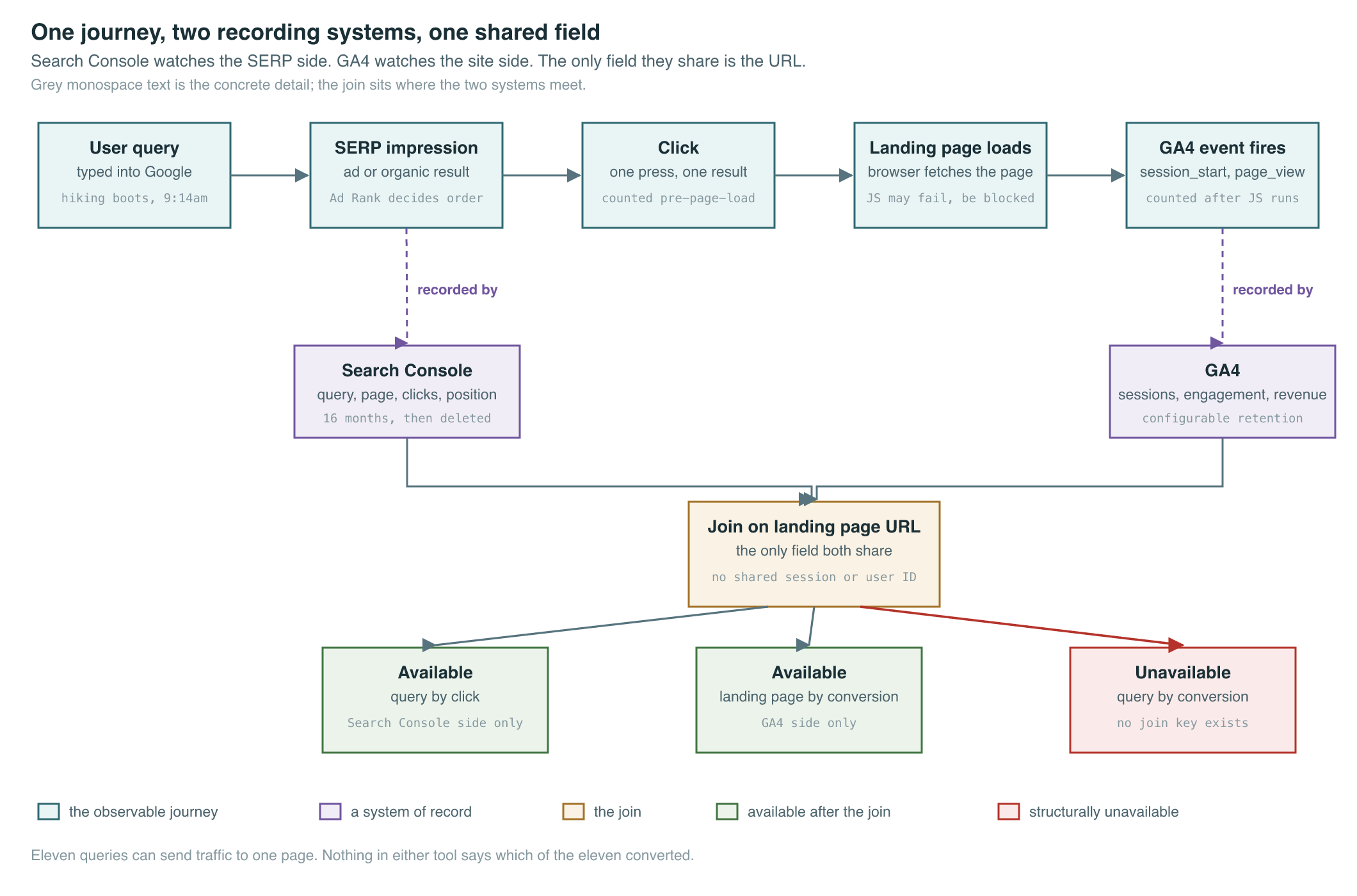
The join key is the landing page. That one design choice sets the ceiling on the entire integration, and it is the most misunderstood limit in the whole Google stack.
Consider what keys are available. Search Console’s grain for queries is query by page by country by device, pre-aggregated, with no user or session identifier anywhere in it. GA4’s grain is event by session by user. The two share exactly one observable field: the URL that was requested. There is no shared identifier connecting a query to a session, because the query never reached your server in the first place.
So the join gives you query by click, from Search Console, and landing page by conversion, from GA4, stitched at the page. It cannot give you query by conversion. If eleven queries send traffic to one landing page and that page converts at three percent, nothing in either tool tells you which of the eleven converted. You can apportion conversions by click share, and people do, but apportionment is an assumption dressed as a measurement, and it will systematically overcredit high-volume informational queries over low-volume commercial ones.
Compare that to paid search, where the same company hands you the key it withholds on the organic side. A Google Ads click carries a GCLID that both the ad system and your site can read, so the query, the campaign, and the conversion travel together on one identifier. Join Keys: GCLID, Floodlight, and Attribution works through that machinery, and The Auction That Ate Advertising covers the business that funds it. The asymmetry is the point: when Google is selling you clicks, you get a join key. When Google is giving them away, you get a URL. Both sides of that trade sit inside one company, which is the tension One Company, Both Sides of the Table opens on.
Building the Bridge Anyway
The structural gap does not mean the two planes are useless together. It means the analysis has to be honest about which questions are measured and which are modelled. Four patterns hold up in practice, and all four want both exports in one BigQuery project rather than two browser tabs.
Revenue per query cluster. Join Search Console’s query-to-page mapping against GA4’s page-to-conversion mapping, group queries into intent clusters, and apportion revenue by click share. Label the output as an estimate every time it appears in a deck. It is still the only commercially defensible way to rank SEO work, because the alternative is ranking by impressions, which pays for traffic nobody wanted.
Striking-distance analysis. Pull pages sitting at average position 5 to 15 with high impressions and weak CTR from the Search Console export. Those are rank-uplift candidates. Then check in GA4 whether those specific landing pages convert at all before anyone writes a content brief. Position elasticity on a page that never converts is a rounding error dressed up as an opportunity.
Four-way traffic-drop decomposition. A decline splits into demand, ranking, presentation, and on-site. Impressions flat or down is demand. Average position moved is ranking. CTR moved at stable position is presentation, usually a SERP feature change or a title rewrite. Sessions and engagement moved with clicks flat is on-site, which means your tags or your page. No single tool can run that decomposition, which is exactly why the pair matters (Practical Ecommerce).
Cannibalization detection. Group the Search Console export by query over time and count how many of your own pages rank for each one. Multiple pages trading positions on a single query is a content-architecture problem that neither the Performance report’s default view nor GA4 will ever surface on its own.
Every one of those patterns runs on exported rows rather than on the interface, and that is not a coincidence. Both tools ship a UI that withholds information the underlying data contains, on purpose, and understanding exactly what gets removed is the next chapter.
Key Sources
| Source | Author/Org | Year | Link | Why it matters |
|---|---|---|---|---|
| Google Webmaster Tools rebrands to Google Search Console | Search Engine Land | 2015 | article | Dates the 20 May 2015 rename and Google’s stated reason for widening the audience |
| Search Console Performance report | Search Console Help | 2018 | docs | Defines the four metrics and the dimensions they can be sliced by |
| Core Web Vitals report | Search Console Help | 2020 | docs | Confirms the report uses 28 days of CrUX field data in three buckets |
| Search Analytics API now gives 25,000 rows per request | Search Engine Land | n.d. | article | Documents the row limits any GSC extraction pipeline has to paginate around |
| Search Console bulk data export | Google Search Central | 2023 | blog | The only route to unaggregated Search Console rows and history past 16 months |
| Search Console data in Google Analytics | Google Analytics Help | 2023 | docs | Specifies the two linked reports and the landing-page join that caps them |
| Pinpoint traffic drops with Search Console and GA4 | Practical Ecommerce | n.d. | article | Sets out the demand, ranking, presentation, on-site decomposition |
| GA4 BigQuery Export schema | Google Analytics Help | 2020 | docs | Gives the GA4 side of any warehouse join, including the three-day restatement |
PM Lens
Papers referenced
- Google Webmaster Tools rebrands to Google Search Console Search Engine Land · 2015
- Search Console Performance report Search Console Help · 2018
- Core Web Vitals report Search Console Help · 2020
- Search Console bulk data export Google Search Central · 2023
- Search Console data in Google Analytics Google Analytics Help · 2023
- GA4 BigQuery Export schema Google Analytics Help · 2020