A marketing team wants to add a remarketing pixel. The pixel is four lines of JavaScript. Getting those four lines onto the site means a Jira ticket, a place in a sprint, a code review, a QA pass, and a release window. Six weeks later the code ships, and the campaign it was supposed to measure has already ended. That was the standing condition of digital marketing in 2012, and it is the problem Google Tag Manager was announced to solve at the eMetrics Summit in Boston on October 1, 2012 (Google Analytics blog, 2012). The feature list Google led with was asynchronous tag loading, multi-account support, and a preview mode. The real product was a change in who holds deploy access.
Four Objects and a JavaScript Array
GTM’s data model is small enough to fit on an index card, and it has barely changed in fourteen years. A container is a versioned bundle of configuration, one per site or app, loaded by a single snippet. A tag is a payload to send somewhere: a GA4 event, a Google Ads conversion, a Floodlight counter, a third-party vendor pixel. A trigger is the condition under which a tag fires. A variable is a value resolved at runtime and injected into tags and triggers, anything from the current page path to a transaction total.
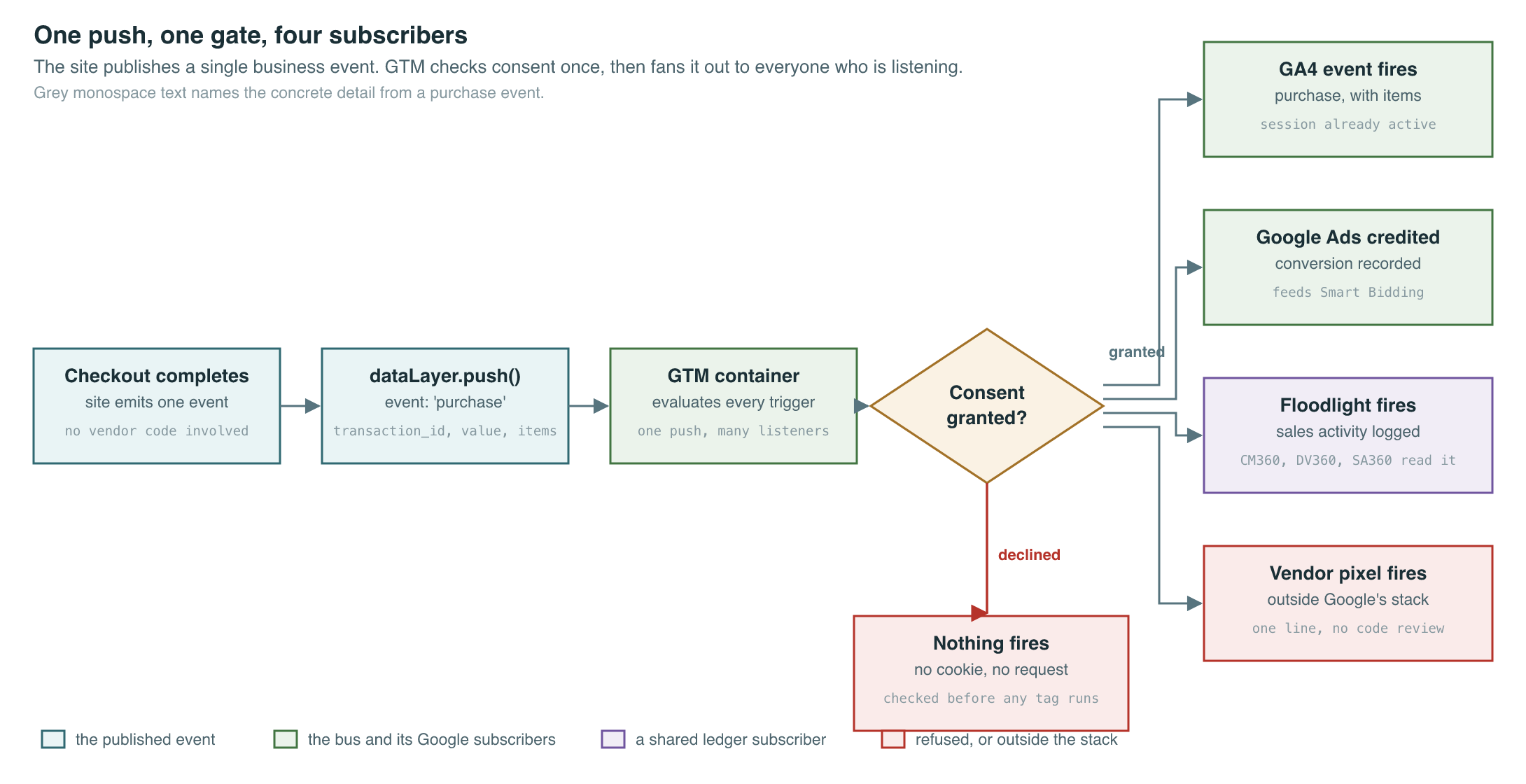
The fifth object is not a GTM object at all. It is a plain JavaScript array on the page called dataLayer, and it is the contract between the website and the container. The site pushes objects into it. GTM watches it. One key inside those objects is reserved: event. When a push includes event, the container evaluates every trigger listening for that name and fires whatever tags are attached.
dataLayer.push({
  event: 'purchase',
  transaction_id: 'T-88421',
  value: 219.40,
  currency: 'INR',
  items: [{ item_id: 'SKU-4409', price: 219.40, quantity: 1 }]
});
That is the whole interface. Three lines of engineering work, once, per business event. The site declares that a purchase happened and what it was worth. It says nothing about GA4, nothing about Google Ads, nothing about Meta or Criteo or a partner’s affiliate tracker.
Publish and Subscribe, Running in a Browser Tab
Read that array as what it structurally is: a message bus with a single publisher and an arbitrary number of subscribers, running inside a browser tab for the roughly two hundred milliseconds a pageview lasts.
Before tag management, the integration pattern was point to point. Every vendor got its own snippet, its own copy of the transaction value, its own placement in the template, and its own bug. Adding an eighth vendor meant an eighth integration and an eighth chance of reading the price after tax when the other seven read it before. Vendor count and engineering work scaled together, linearly, forever.
The bus inverts that. The site publishes one semantically meaningful business event, and N vendors subscribe to it through their own tags. Adding the eighth vendor is a configuration change inside the container, made by someone who has never opened the repository. Removing a vendor is a checkbox. The site’s job collapses to emitting a correct, stable, well-named event stream, which is the only part that actually requires knowing how the application works.
The failure modes are the ones any message bus has. Naming drift: two teams publish purchase and Purchase and only one trigger matches. Schema drift: a redesign renames value to revenue and six months of conversion data quietly reads zero. Race conditions: the container loads before the push lands, so the trigger never sees the event. Ordering assumptions: a tag needs the user ID that a later push supplies. GTM’s answers are container versioning, a preview and debug mode that shows the event stream and every trigger evaluation in real time, and the discipline of treating the dataLayer as a published API with a spec rather than as scratch space. The tooling is good. The discipline is where most implementations fail, and the reason is organizational, not technical.
Deploy Access Moved Before Anything Else Did
GTM’s decisive change was that it decoupled marketing deployment velocity from the engineering release cycle. A campaign pixel that used to wait for a train now ships in ninety seconds, published by someone in the marketing org.
That is a genuine efficiency gain, and it has a cost that took a decade to fully surface. The container executes arbitrary JavaScript in first-party context on every page. Custom HTML tags can do anything the page can do: read the DOM, read cookies, make network calls, rewrite content. Publish rights to a GTM container are, functionally, code deploy rights to production, held by a team whose review process is a campaign brief rather than a pull request. Most organizations discovered this only after an audit, or after a slow page, or after a tag started leaking a field it should not have seen.
Google’s partial answer to that was custom templates, introduced in 2019. A template is a sandboxed tag definition written against a restricted API, with declared permissions for the specific cookies, domains, and globals it is allowed to touch, and a community gallery where vendors publish reviewed versions. It converts “paste this vendor’s arbitrary JavaScript” into “grant this vendor’s template these four permissions,” which is a real improvement in a container that a marketing team publishes without code review. Adoption is uneven, because a Custom HTML tag takes thirty seconds and a template requires the vendor to have built one.
The other predictable outcome of easy deployment is accumulation. Containers grow. A tag added for a three-week campaign in 2019 is still firing in 2026, because removing tags creates risk and nobody is measured on container hygiene. Every one of those tags costs page weight, a network request, and a share of the main thread, which is why a container that grew unmanaged for five years shows up as a Core Web Vitals problem owned by an engineering team that cannot see inside it. The governance practice that actually works is unglamorous: an annual audit that lists every tag, its owner, and its last confirmed business purpose, with the default being removal when no owner can be named.
Regulation eventually turned that same chokepoint into an asset. Because every marketing tag on the site already fired through one container, there was exactly one place to enforce consent. Consent Mode wires four signals into the container, analytics_storage and ad_storage from the original version, plus ad_user_data and ad_personalization added in version 2, and tags check those signals before they read or write anything (Google tag docs). Version 2 became mandatory for EEA and UK Google Ads traffic on March 6, 2024, driven by the Digital Markets Act rather than by GDPR, and Consent as an API covers how that mandate reshaped the tag layer. The point here is narrower: a legal requirement about data collection became implementable as a container setting, because the container was already the single point every collection call passed through.
Moving the Bus Out of the Browser
Server-side tagging entered public beta on August 12, 2020 (MediaPost, 2020; Google tag platform docs). A server container runs on the advertiser’s own Google Cloud project, on App Engine or Cloud Run, and sits between the browser and the vendor endpoints. The browser sends one hit to a first-party endpoint the advertiser controls. The server container fans that hit out to GA4, Google Ads, and everyone else, server to server.
The new entity that makes this work is the Client, and it is worth understanding because it has no client-side equivalent. In a web container, the input is a dataLayer push. In a server container, the input is a raw HTTP request, and a Client’s job is to claim that request and parse it into a unified event data object, which is then handed to a virtual container where tags fan it out (Simo Ahava, “Server-side Tagging in GTM”). The GA4 Client knows how to read a GA4 measurement hit. Other Clients read other wire formats. Triggers still exist inside the server container, but the Client is what turns HTTP into an event in the first place.
The reason anyone paid for this was cookies, specifically Safari’s. Intelligent Tracking Prevention capped the expiry of JavaScript-set cookies at seven days in February 2019 with ITP 2.1 (WebKit, 2019). In April 2020 WebKit extended the same seven-day treatment to all remaining script-writable storage, including LocalStorage, IndexedDB, and Service Worker registrations, closing the obvious workaround (WebKit, 2020). A GA4 client ID written by JavaScript therefore had a seven-day ceiling in Safari, which means a returning visitor on a four-week purchase cycle looked like a new user every time.
Cookies set by an HTTP Set-Cookie response header from the site’s own domain were never subject to that cap. Host a tagging server on a genuine first-party subdomain and the container can set its identity cookies, FPID and FPLC, through response headers instead of through JavaScript, and the seven-day limit does not apply. That is the actual mechanism behind every server-side tagging pitch deck. Two caveats matter in practice. WebKit removed the hard expiration cap on JavaScript cookies in 2022 and replaced it with deletion after seven days of browser use without user interaction on the site, so the constraint changed shape rather than disappearing (Simo Ahava). And the subdomain has to resolve via A or AAAA records to infrastructure the advertiser controls, because WebKit shipped a CNAME cloaking defense in November 2020 that caps cookies set through a CNAME-aliased third-party host at seven days anyway (WebKit, 2020).
| Web container | Server container | |
|---|---|---|
| Where it runs | the visitor’s browser tab | advertiser’s GCP project, App Engine or Cloud Run |
| Input entity | dataLayer push | HTTP request parsed by a Client |
| Identity cookies | written by JavaScript, subject to ITP limits | written via Set-Cookie headers from a first-party subdomain |
| Vendor integration | vendor’s browser pixel | server-to-server API, where the vendor offers one |
| Credentials | exposed to the page | never leave the server |
| Marginal cost | zero | roughly €120 to €250 per month and up in cloud spend |
| External auditability | anyone can open DevTools and watch | none |
That last row is the honest cost. Simo Ahava, whose blog is the closest thing this part of the stack has to a reference manual, flags it himself: moving collection server-side enables data collection that no external party can inspect. A researcher, a regulator, or a journalist can open browser developer tools and enumerate every client-side tag on a page. Nobody outside the advertiser can see what a server container does with a hit after it arrives. The other practical limit is unglamorous: relatively few vendors ship real server-to-server ingestion APIs, so a meaningful share of server containers end up proxying requests that are still, underneath, browser pixels.
Two Dates Google Has Already Put on the Calendar
On April 10, 2025, GTM changed a default. Containers with Google Ads conversion tags or Campaign Manager Floodlight tags began automatically loading a Google tag before those tags fire, on the reasoning that a Google tag is a prerequisite for event tracking and manual configuration was error-prone. GA4 tags were not affected (Simo Ahava, 2025). Read plainly, Google decided that a piece of its own infrastructure would be present in containers whether the container owner had configured it or not.
On May 20, 2026, at Google Marketing Live, Google announced that GTM and the Google tag are merging. Every Google tag is upgraded to a fully capable GTM container, which hands debugging and version control to sites that only ever pasted a gtag.js snippet. Existing containers get an opt-in path that removes the gtag.js JavaScript dependency for data transmission, and a new Settings section centralizes consent, redaction, and cross-domain configuration (PPC Land, 2026). The rollout is opt-in, though features like the visual event builder require opting in to get them.
Those two dates describe the same trajectory. The 2012 container was a neutral pipe: Google’s tool, but genuinely vendor-agnostic, and the incumbent tag managers it undercut were paid products from companies with no ad business. Fourteen years later the pipe auto-loads Google’s own tag and is being merged into Google’s own tagging product. The GA4 event model that the dataLayer feeds is covered in The Death of the Session; the deprecation that server-side tagging was built to survive, and that never arrived, is the next chapter.
Key Sources
| Source | Author/Org | Year | Link | Why it matters |
|---|---|---|---|---|
| Digital marketing made (much) easier: Introducing Google Tag Manager | Google Analytics blog | 2012 | blog | The October 1, 2012 launch post, with Google’s own framing of the problem as marketer velocity rather than engineering |
| Google Server-Side Tagging Introduced To Improve Performance, Consumer Data Security | MediaPost | 2020 | article | Dates the server-side tagging public beta to August 12, 2020 |
| Server-side Tagging In Google Tag Manager | Simo Ahava | 2020 | blog | The reference explanation of the Client entity and the event data object |
| Intelligent Tracking Prevention 2.1 | WebKit | 2019 | blog | The seven-day cap on JavaScript-set cookies, the constraint that created the server-side market |
| Full Third-Party Cookie Blocking and More | WebKit | 2020 | blog | Extends the seven-day treatment to LocalStorage and other script-writable storage |
| CNAME Cloaking and Bounce Tracking Defense | WebKit | 2020 | blog | Why a tagging subdomain needs A/AAAA records rather than a CNAME alias |
| Expiration Cap Removed From JavaScript Cookies In WebKit Browsers | Simo Ahava | 2022 | blog | Corrects the common claim that the seven-day cap is still a hard expiry limit |
| Clarification On GTM Auto-Loading Google Tag For Ads And Floodlight Events | Simo Ahava | 2025 | blog | Documents the April 10, 2025 default change and its exact scope |
| Google Tag Manager and Google tag are merging: what actually changes | PPC Land | 2026 | article | The May 20, 2026 merger announcement and what is opt-in versus automatic |
PM Lens
Papers referenced
- Digital marketing made (much) easier: Introducing Google Tag Manager Google Analytics blog · 2012
- Intelligent Tracking Prevention 2.1 WebKit · 2019
- Full Third-Party Cookie Blocking and More WebKit · 2020
- CNAME Cloaking and Bounce Tracking Defense WebKit · 2020
- Google Server-Side Tagging Introduced To Improve Performance, Consumer Data Security MediaPost · 2020
- Server-side Tagging In Google Tag Manager Simo Ahava · 2020
- Expiration Cap Removed From JavaScript Cookies In WebKit Browsers Simo Ahava · 2022
- Consent mode concepts Google tag platform documentation · 2024
- Clarification On GTM Auto-Loading Google Tag For Ads And Floodlight Events Simo Ahava · 2025
- Google Tag Manager and Google tag are merging: what actually changes PPC Land · 2026