Export last month’s query table from the Search Console Performance report, sum the clicks column, and compare that sum to the total printed on the chart directly above it. The chart is higher. No filter is misapplied, nothing is broken, and refreshing will not help. Search Console is showing you a total that includes rows it has decided not to name. That gap is deliberate, it is documented, and it is the first of four separate mechanisms across Search Console and GA4 whose entire job is to remove information before it reaches you.
Queries Google Will Not Name
Search Console withholds rare queries. A search string issued by only a few dozen users over a window of roughly two to three months is treated as potentially identifying, on the reasoning that a query can contain a person’s name, a home address, a medical condition, or an account number. Those queries are dropped from the query dimension.
The reporting behavior that follows is the part that generates support tickets. Anonymized queries are excluded from the query table but remain inside aggregate chart totals, so the chart and the table legitimately disagree. Apply any query filter and the totals themselves fall, because filtering by query restricts the entire report to named queries (Google Search Central). There are two different totals living in one report, and which one you see depends on whether a query filter is active. Neither number is wrong. They answer different questions, and the interface does not say so.
That behavior also gives you a free measurement. Pull total clicks with no filter, then sum the clicks in the query table, and the difference over the total is your own site’s anonymization rate. It costs one API call and it is worth knowing before anyone builds a keyword strategy on the visible rows.
What the 46.8 Percent Figure Does and Does Not Establish
How much traffic disappears into anonymization? The most-cited estimate comes from Ahrefs, which analysed 22 billion clicks across 887,534 properties and put anonymized queries at 46.8 percent of all Search Console traffic (SEO Stack).
Handle that number carefully. It is a third-party study of the properties inside one vendor’s dataset. Google has not published or confirmed a comparable figure, and per-site results vary enormously with the shape of demand. A brand whose traffic concentrates on a hundred head terms sees very little anonymization. A large ecommerce catalogue serving millions of long-tail queries sees a great deal. Quoting 46.8 percent as though it applies to your property is exactly the kind of borrowed precision this chapter exists to warn about.
What the study does establish is an order of magnitude, and that changes how you should read a query report. Anonymization is not a rounding error at the bottom of the table. On a long-tail-heavy site it can be the largest single segment of search demand, and it is precisely the segment holding genuinely new intent: novel phrasings, emerging product names, questions nobody has asked before. Keyword research built only on named queries systematically over-indexes on terms you already rank for, because those are the ones with enough volume to survive the filter.
Thresholding Is the Bill for Google Signals
GA4’s version of the same idea works on rows rather than on strings. When too few users sit behind a row, GA4 withholds it, most aggressively on demographic and interest dimensions where a small cell could identify someone. The interface shows a data-quality notice saying a threshold was applied. It does not tell you how much was removed.
Two conditions have to hold together for thresholding to bite: Google Signals is enabled on the property, and the report is being served with a user-based reporting identity (Analytics Help; Optimize Smart). Both are settings. Switch reporting identity to Device-based, or turn Signals off, and thresholding stops applying to reports going forward.
The word “forward” is doing real work there. Changing the setting does not retroactively unlock a history collected under Signals with a user-based identity. Whatever was suppressed while those settings were live stays suppressed. This is the single most expensive misunderstanding in GA4 administration, because the property setting that costs you data is usually switched on in month one by someone who wanted remarketing lists, and the cost surfaces in month nine when someone else cannot get an age breakdown to render.
That trade is worth stating plainly. Signals buys cross-device stitching, demographics and interests, and Google Ads remarketing audiences. It charges row-level suppression on the reports most useful for audience planning. The same company sells you the analytics product and buys the audience the analytics product builds, which is the structural tension One Company, Both Sides of the Table opens the book with.
Five Hundred Values, Then (other)
The third mechanism has nothing to do with privacy. It is a processing limit.
A GA4 dimension that exceeds 500 distinct values in a single day is treated as high-cardinality, and every row past that limit is collapsed into one bucket labeled (other) in both standard Reports and Explorations (Online Metrics). The label is literal. Your data is still in the totals; it is just no longer attributable to anything.
The dimensions that trip this are predictable and they are the ones people care about most: page_location on any large site, especially with query parameters attached, plus custom dimensions carrying transaction IDs, search terms, product SKUs, article slugs, or user identifiers. Anything with an ID in it is a cardinality bomb.
The failure mode is quiet and cumulative. The 500-value limit applies per day, so each daily table collapses independently, and a month-level view can show (other) absorbing a large share of sessions without any single day looking alarming. Nothing errors. A report just gradually stops being able to name your pages.
Every mitigation is a collection-time decision: strip query parameters before sending page_location, bucket values into categories rather than sending raw IDs, and keep high-cardinality identifiers in event parameters you plan to query in BigQuery rather than in reporting dimensions. You cannot repair cardinality collapse after the fact from the interface, which is the pattern the whole chapter converges on.
Sampling, and Two Filters That Disagree
The fourth mechanism is ordinary statistical sampling. Explorations sample above 10 million events per query on standard properties and above 1 billion on Analytics 360 (InfoTrust). Standard reports read from pre-aggregated tables and are not sampled the same way, which is why the same question asked in two surfaces returns two numbers.
They are also not quite the same question, for a second and more annoying reason. Standard Reports apply filters case-insensitively. Explorations apply them case-sensitively. A filter on /Checkout includes /checkout in one surface and excludes it in the other, silently, with no warning and no error. Anyone who has watched two analysts produce different funnel numbers for the same week has probably watched this specific mismatch.
Sampling at least announces itself. An Exploration that sampled shows a data-quality indicator naming the percentage of events used, so the number is flagged as an estimate before anyone screenshots it. The case-sensitivity difference announces nothing at all, which makes it the more dangerous of the two. The operational rule that follows is boring and it works: pick one surface per recurring question and write the filter definition down next to the metric definition. Two analysts asking the same question in two surfaces will produce two answers, and the meeting will spend forty minutes deciding which analyst is wrong instead of which number is right.
| Mechanism | What triggers it | Where it shows up | Removable after collection |
|---|---|---|---|
| Anonymized queries | rare queries, roughly a few dozen users over 2 to 3 months | Search Console query tables, totals stay intact | no, the data is never delivered |
| Thresholding | Google Signals enabled plus user-based reporting identity | GA4 reports, worst on demographics and interests | not for history already collected |
| Cardinality collapse | more than 500 distinct daily values on a dimension | (other) rows in Reports and Explorations | yes, via the BigQuery export |
| Sampling | Exploration queries above 10M events, or 1B on 360 | Explorations only | yes, via the BigQuery export |
The Escape Hatch, and Its Limits
Two of those four mechanisms are properties of the interface rather than of the data, and the fix for both is the same: leave the interface.
The GA4 BigQuery export writes the raw event log, one row per event, with event_params and user_properties as nested repeated fields (GA4 BigQuery Export schema). There is no cardinality limit on a raw event log, because nothing is being aggregated into a dimension. There is no Exploration sampling, because you are writing SQL over complete daily tables. There is no report-level thresholding, because rows are events rather than aggregated user counts. For a large property, that export is not an advanced option. It is the difference between reporting on your pages and reporting on (other).
Search Console’s bulk data export to BigQuery does the equivalent on its side, delivering unaggregated rows and breaking the 16-month retention wall (Google Search Central). It does not, however, deliver anonymized queries. Suppression that happens inside Google’s own aggregation is not something an export can undo.
That distinction is the most useful thing to carry out of this chapter, because it splits every “why is this number missing” question into two categories with completely different answers.
Presentation-layer loss. Thresholding, cardinality collapse, Explorations sampling, and the case-sensitivity mismatch. All four are decisions made when data is served to you, not when it is collected. All four are solved by exporting to BigQuery and querying the log yourself.
Collection-layer loss. Anonymized queries, consent-denied visits that produced only a cookieless ping, and cross-device journeys that were never stitched. None of it is in any export, because none of it was ever collected in the form you want. Modelled conversions are a related case: the modelling happens in Google’s reporting layer, so modelled conversions do not appear as rows in your table at all, and a BigQuery number can be lower than the interface number for exactly that reason. Consent as an API works through how that machinery decides what gets collected in the first place.
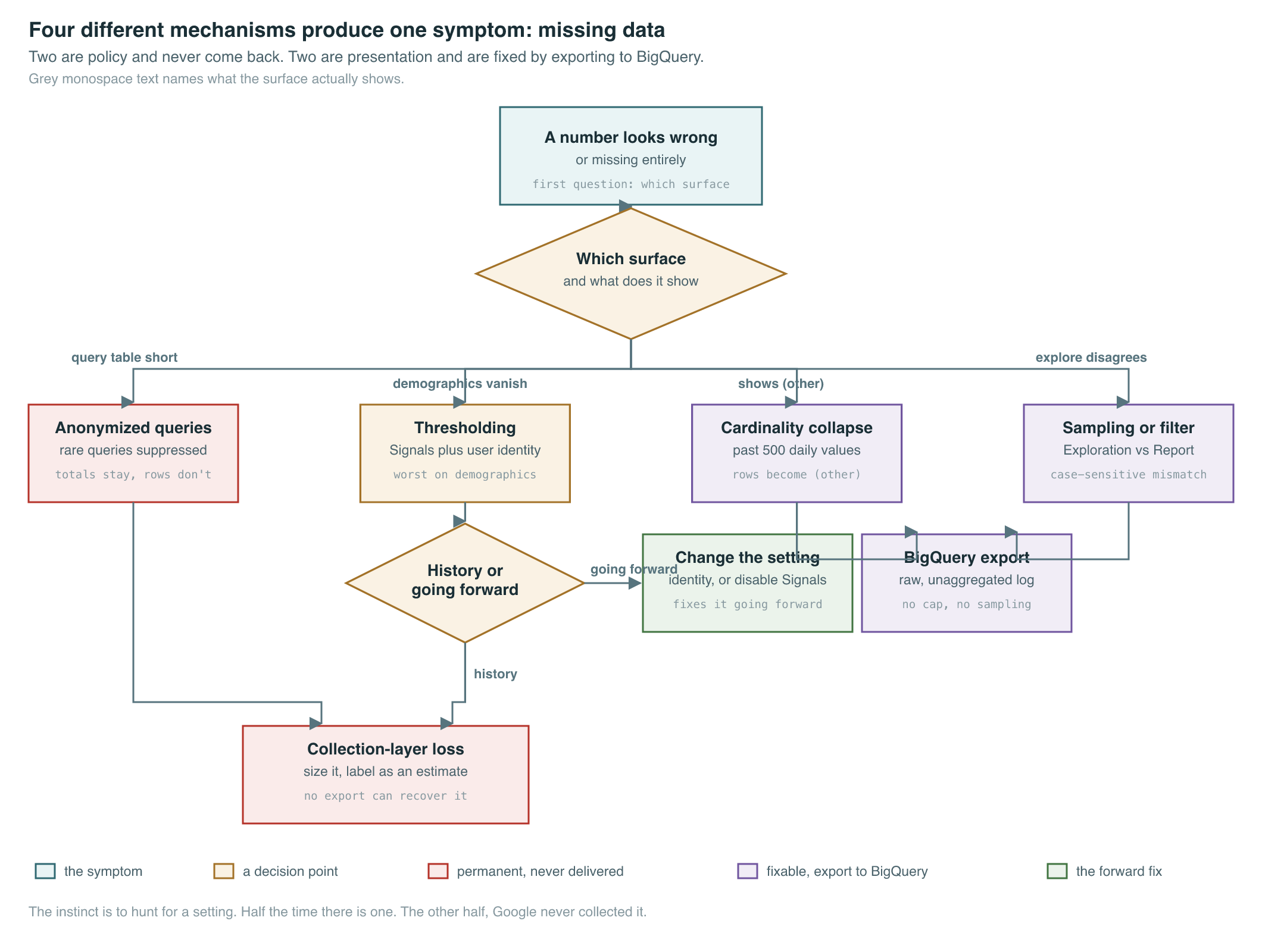
The instinct when a number goes missing is to hunt for a setting. Half the time there is one, and the export fixes it permanently. The other half you are looking at data Google never collected, or never intends to hand over, and the only professional response is to size the gap, label the estimate as an estimate, and stop presenting the visible portion as the whole. The gap between query-level clicks and page-level conversions covered in Two Views of One Click is structural. The gaps in this chapter are policy. Confusing the two is how measurement programs quietly start reporting fiction.
Key Sources
| Source | Author/Org | Year | Link | Why it matters |
|---|---|---|---|---|
| Search Console performance data deep dive | Google Search Central | 2022 | blog | Google’s own account of anonymized queries and why chart totals exceed table sums |
| Why is data missing from Google Search Console | SEO Stack | n.d. | article | Reports the Ahrefs analysis of 22 billion clicks and the 46.8 percent figure |
| About Google Signals | Google Analytics Help | 2020 | docs | Ties thresholding to Signals plus a user-based reporting identity |
| Fixing the data threshold issue in GA4 | Optimize Smart | n.d. | article | Documents that changing the setting works forward only, not retroactively |
(other) in GA4 | Online Metrics | n.d. | article | Establishes the 500 distinct daily values cardinality limit and where it applies |
| GA4 reports sampling, cardinality and thresholding | InfoTrust | n.d. | article | Gives the 10 million and 1 billion event sampling thresholds for Explorations |
| GA4 BigQuery Export schema | Google Analytics Help | 2020 | docs | The raw event log that removes cardinality collapse and sampling entirely |
| Search Console bulk data export | Google Search Central | 2023 | blog | The GSC-side escape hatch, which still does not return anonymized queries |
PM Lens
Papers referenced
- Search Console performance data deep dive Google Search Central · 2022
- About Google Signals Google Analytics Help · 2020
- GA4 BigQuery Export schema Google Analytics Help · 2020
- Search Console bulk data export Google Search Central · 2023
- Consent mode overview Google Tag Platform · 2024